The Wave Texture in OpenAI's New Image Models
On September 8, 2026, OpenAI released two new image models: Flare and Sunburst. An image model is an AI that creates a picture from a text description. You send a sentence, back comes an image.
Flare replaces the previous standard and delivers better quality with shorter wait times. Sunburst is the premium variant for more controlled results. Both cost the same, but Sunburst takes noticeably longer.
I tested both on the same day via the API (Application Programming Interface, the channel through which you can use the models directly from code). The text description:
old oil style painting, stoic philosopher plato teaching computer science in the ancient school of athens in a server room, accidentally Renaissance
In plain English: an oil painting where the ancient philosopher Plato teaches computer science in a server room, Renaissance style. Flare took 22 seconds, Sunburst 28. As a control, I had the same scene generated by Google’s Gemini, a different image model.

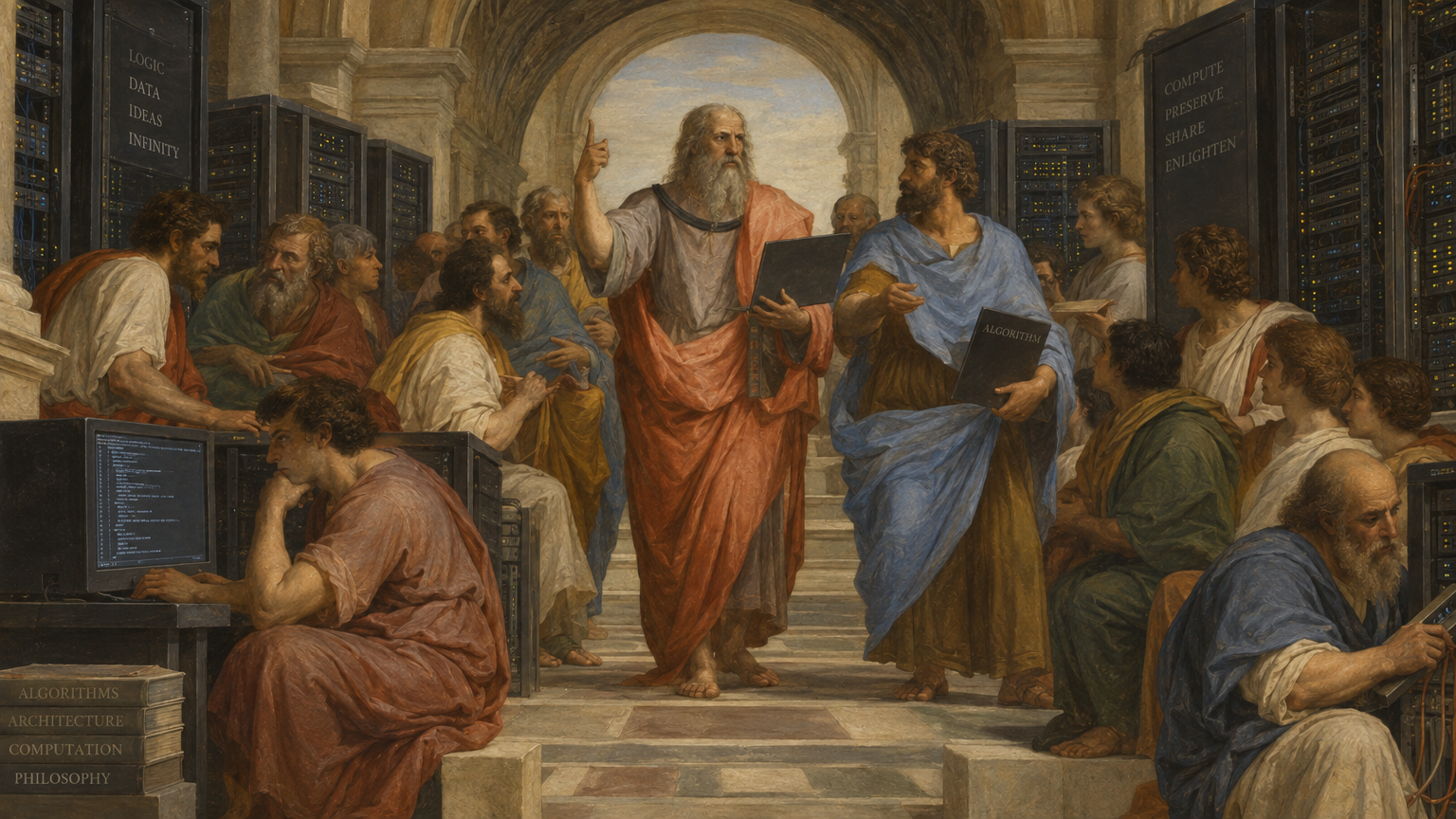

Flare tells a story: a legible chalkboard with code, books titled “Python, Algorithms, Networks”. Sunburst leans closer to Raphael’s School of Athens, symmetrical, with server racks as columns. Both images are stylistically convincing. Flare renders text almost flawlessly.
The wave texture from the predecessor model was immediately visible. Robes, walls, hair, all carrying the same wavy pattern. Two new models, the same pattern.
What This Texture Is
The pattern is hard to put into words. You could also call it a crinkle, ripple, or noise texture.
It doesn’t stand out when you zoom in close. It shows up when you take in a larger area of the image: the brain catches the repetition. Fabric, marble, skin, and background all carry the same surface texture, as if a film were laid over the picture.
It becomes especially obvious in groups of people. Every head gets nearly the same hair texture, every robe the same wave pattern. Once I had seen it, I found it in every subsequent OpenAI image.
Higher resolution and quality settings barely help. Flare at its highest setting sometimes shows even stronger waves, because the model generates more detail in the fabric folds. Sunburst at maximum quality delivers the smoothest result: soft brush transitions, nearly clean walls. But the pattern stays visible in hair and groups.
OpenAI marks its images with SynthID, an invisible watermark from Google DeepMind that flags where an image came from; it has been embedded since the 2.5 models. The wave texture isn’t the watermark, though: it was already there in the predecessor model, before SynthID was introduced. And an embedded watermark would leave a regular grid behind, which the frequency analysis doesn’t find.
Why No Computer Finds the Pattern
Claude and I tried four approaches to detect the pattern automatically. None produces a metric that reliably separates OpenAI images from the Gemini control.
We searched for regular grids, measured the fine structure on smooth surfaces, compared the orientation of structures, and checked the signal strength on manually marked areas. On every measurement, Gemini has more measurable texture than OpenAI.
That sounds backwards, and it feels that way too.
The eye still sees the problem in OpenAI’s images. The reason: it’s not the amount of texture that stands out, but the uniformity. Fabric, stone, and skin all carry the same fine structure in OpenAI’s images. In Gemini’s image, marble has a different surface than fabric, and fabric a different one than skin. That is the difference, and no simple measurement captures it.
An automatic filter would need a trained classifier: a system that has learned what different materials normally look like.
Two Images That Make the Pattern Visible
High-pass filter: A high-pass filter removes large-scale color gradients and leaves only the fine structures behind. Think of it as an X-ray view for surfaces.
In the comparison image, Gemini shows an etching with calm areas where there is little detail. All three OpenAI variants (Flare, Sunburst, Codex) are evenly filled with fine grain, on every surface. Codex isn’t a separate API model here but the Codex tool’s built-in image model: it runs against my included ChatGPT quota instead of the API, and which model sits behind it can’t be chosen. This image carries the texture too, clearly under the high-pass, only faintly to the naked eye.
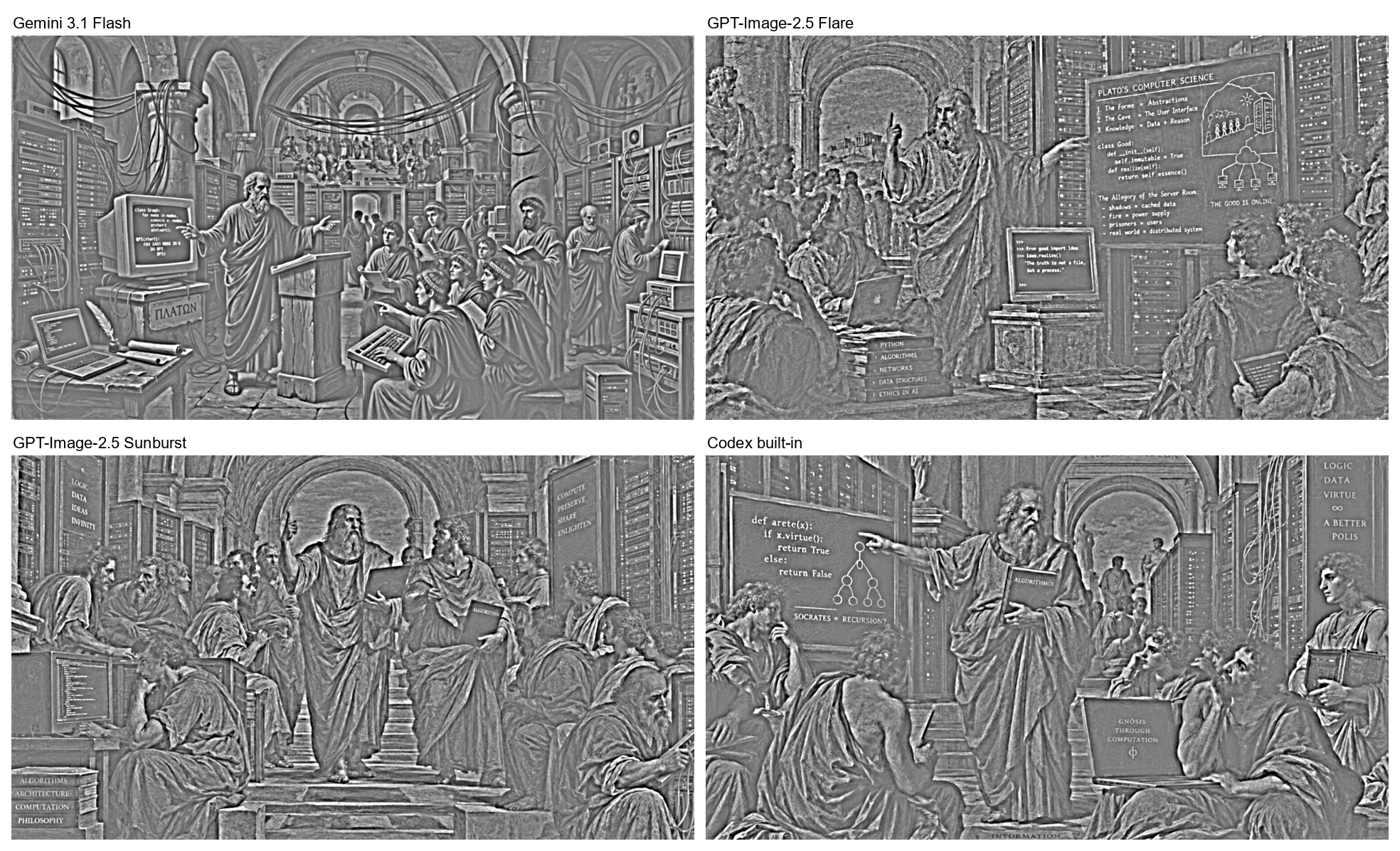
All high-pass images at full resolution: Flare, Sunburst, Codex, Gemini.
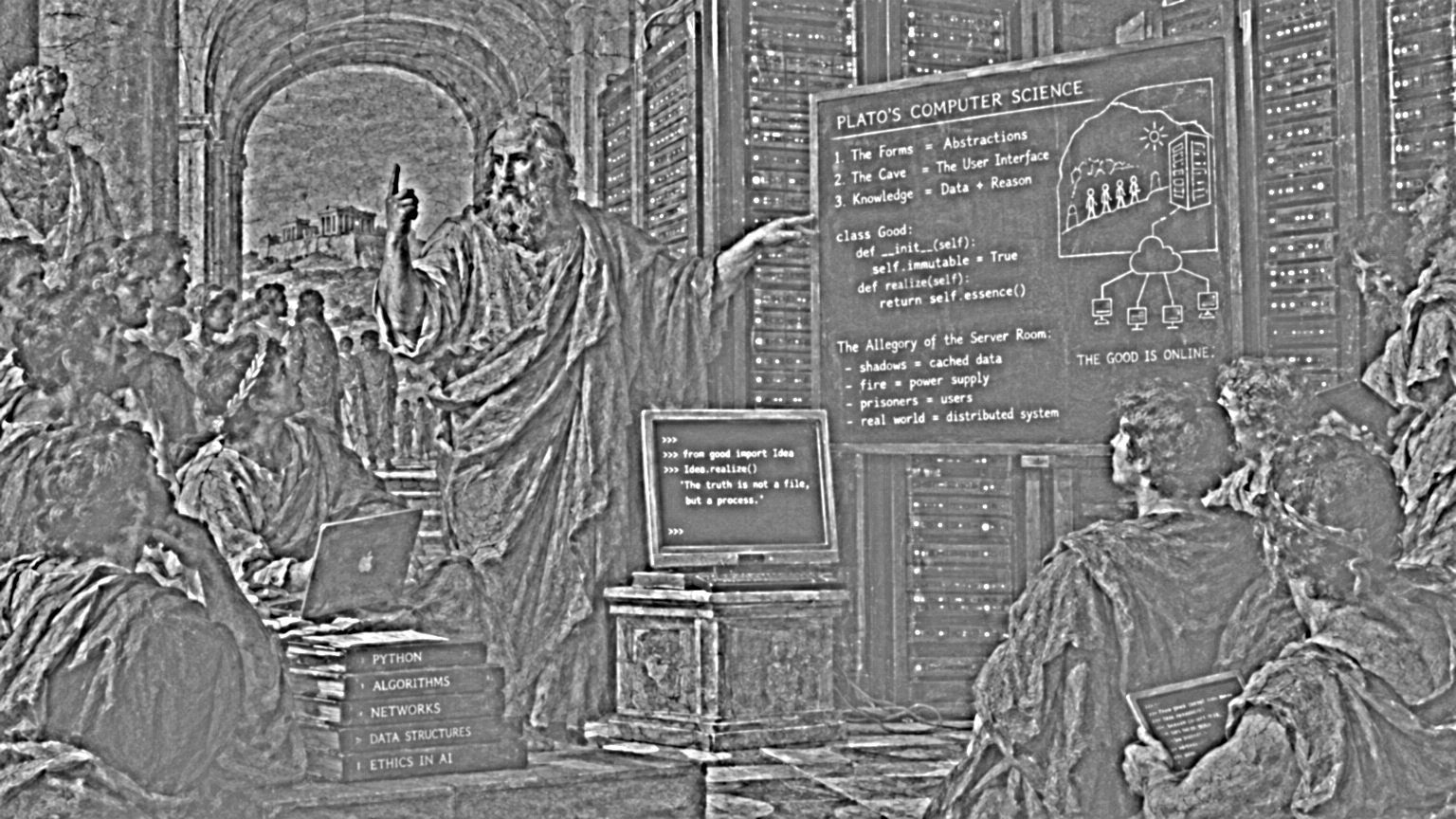



Squint test: The opposite of zooming in. The images get shrunk down and a mid-range structure band gets isolated. Objects, people, and architecture disappear. What is left in Gemini is a recognizable drawing with arches and outlines. What is left in Flare is uniform noise.
Two gain levels. Level 5 brings out the patterns in flat areas, level 7 the wave structure at the edges. Both images show the grayscale original on top, the isolated band below.
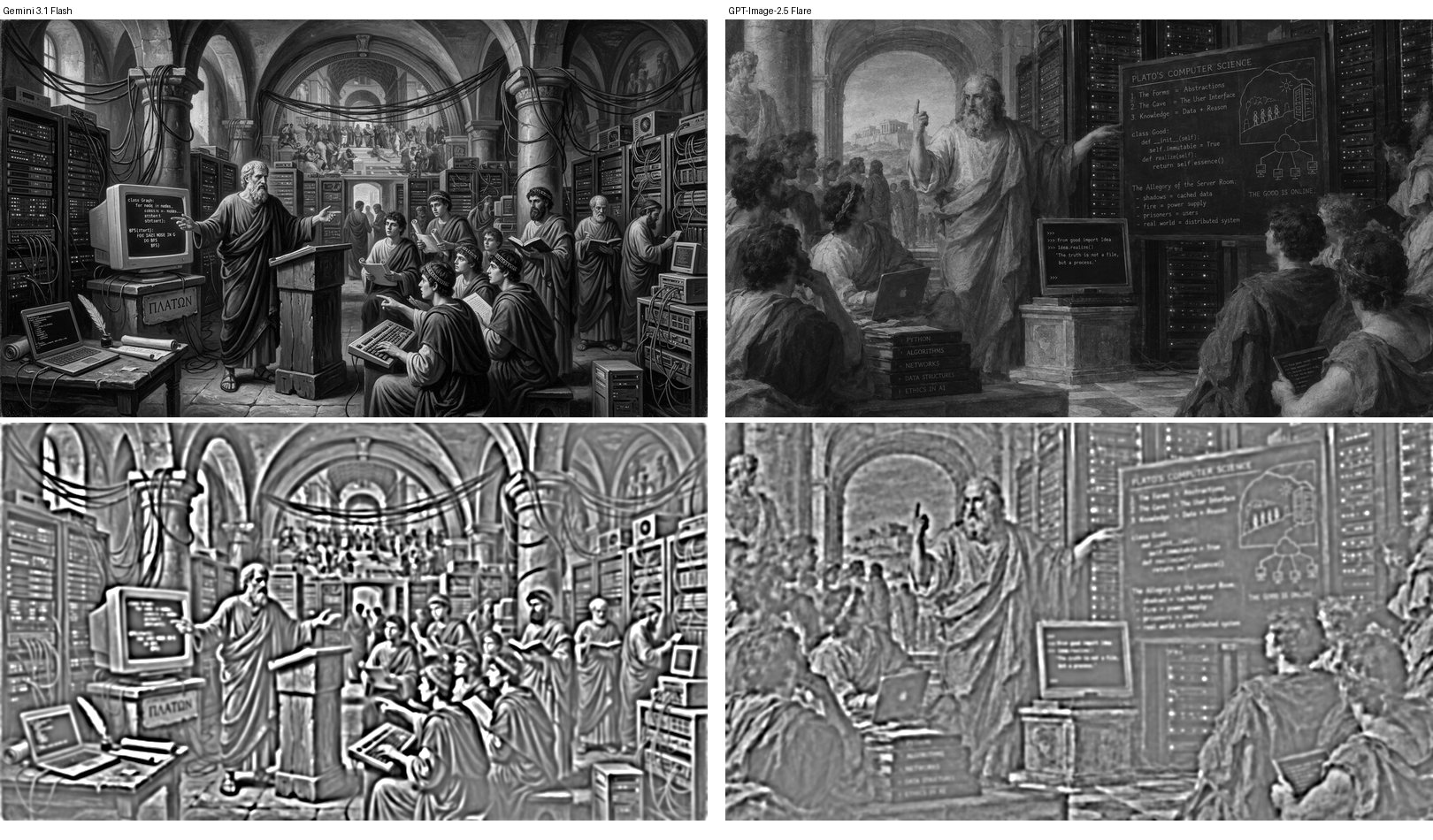
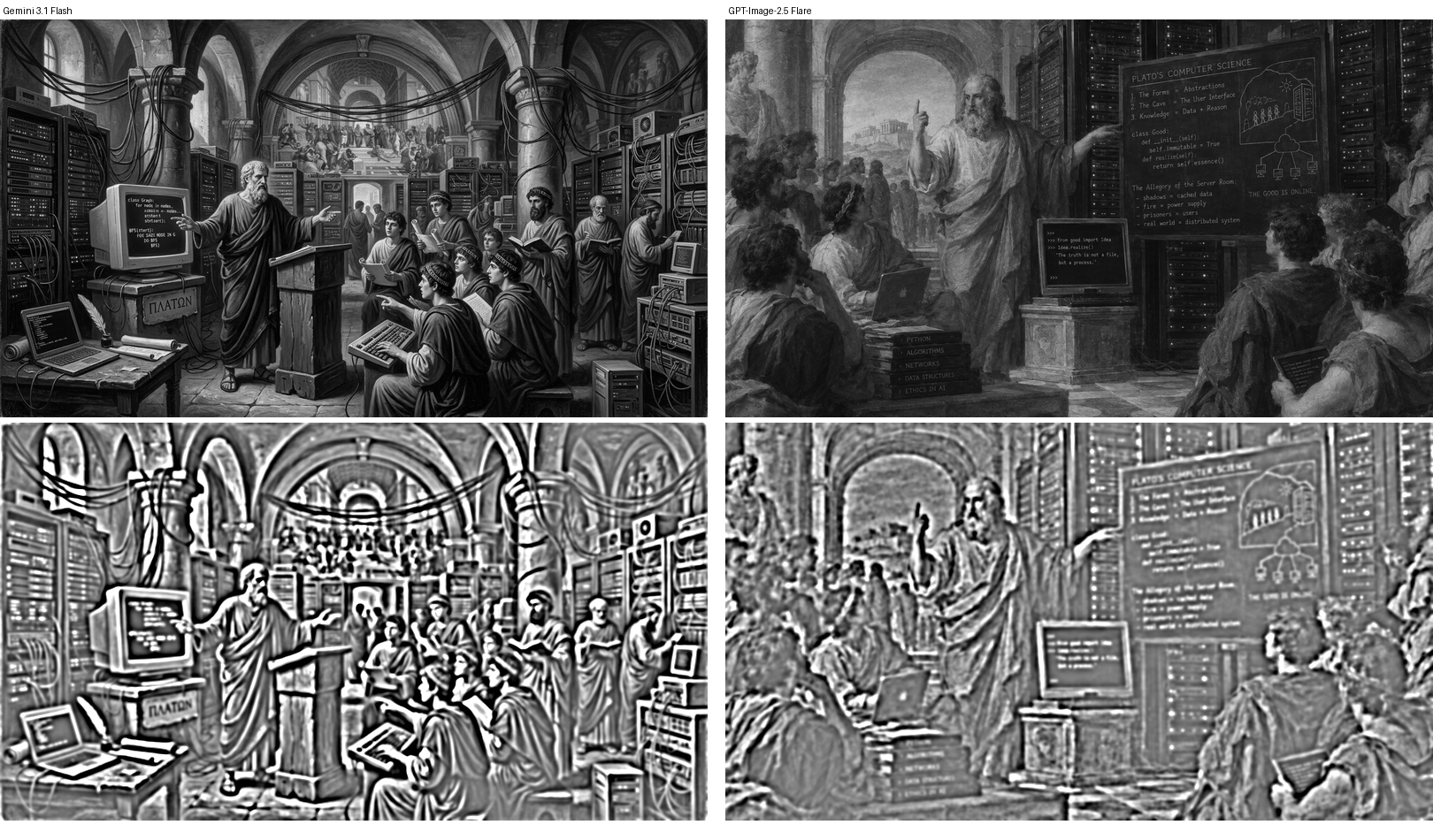
The original images: Flare, Sunburst, Gemini.
The pattern sits just below normal viewing resolution. On a monitor at full width, it is immediately there.
For transparency: the Gemini image is a JPEG at 1376 by 768 pixels, the OpenAI images are PNGs at 1536 by 864. After downscaling for the filter, the difference does not matter.
What This Means for Me
Flare and Sunburst are a step forward in text, composition, and speed. As long as the wave texture stays visible on certain subjects, I fall back to Gemini there. There are images where the pattern is barely visible. In others, it jumps out immediately.
The best mitigation within OpenAI’s models: Sunburst with the highest quality setting. The wait time doubles, the cost stays the same.
If you have a ChatGPT subscription and do not want to set up your own developer access: OpenAI offers Codex, a tool that can generate images without additional costs. The quality is good; in my test image the pattern was even fainter than Flare’s.