Wave Texture Part 2: What the Eye Sees and No Formula Finds
What This Is About
In Part 1 I had described a pattern that clings to OpenAI’s AI-generated images: a fine ripple on surfaces that should be smooth. Fabric, stone, skin, background. I see it in every OpenAI image instantly. Afterwards I wanted to know whether a mathematical method could make it visible too. So I asked Claude, and we started trying out measurement approaches.
About Ten Attempts, None Works
Claude ran about ten different approaches. Some break the image down into frequencies (imagine splitting a sound into high and low notes, only for pixels instead of audio). Others count how often certain pattern types appear. Others still search for copied patches inside the image.
None of them could reliably tell OpenAI images apart from others.
Claude explained the failure like this: the measurements average over the entire image and discard the shape in the process; but the pattern is a spatial property.
Two errors Claude noticed on its own. First the photo control group consisted of Windows wallpapers that were actually 3D renderings. Then certain filters let through large-scale brightness gradients and produced an apparently clean separation.
About DINOv2 (a pre-trained model that compares images but was not trained to recognize OpenAI images) Claude remarked: “I should have thought of that beforehand.” DINOv2 was deliberately fed blur and color shifts during training so it would learn to ignore them. It recognizes what something is and tunes out the technique.
An Invisible Checkerboard
While evaluating the frequencies Claude found a side result. In the unmodified OpenAI originals, neighboring pixels are alternately a tiny bit brighter and darker, like the light and dark squares of a checkerboard. The difference is so small that nobody can see it. Only when you average over the whole image does it show up. In all 31 images checked first it was clear. With other generators barely.
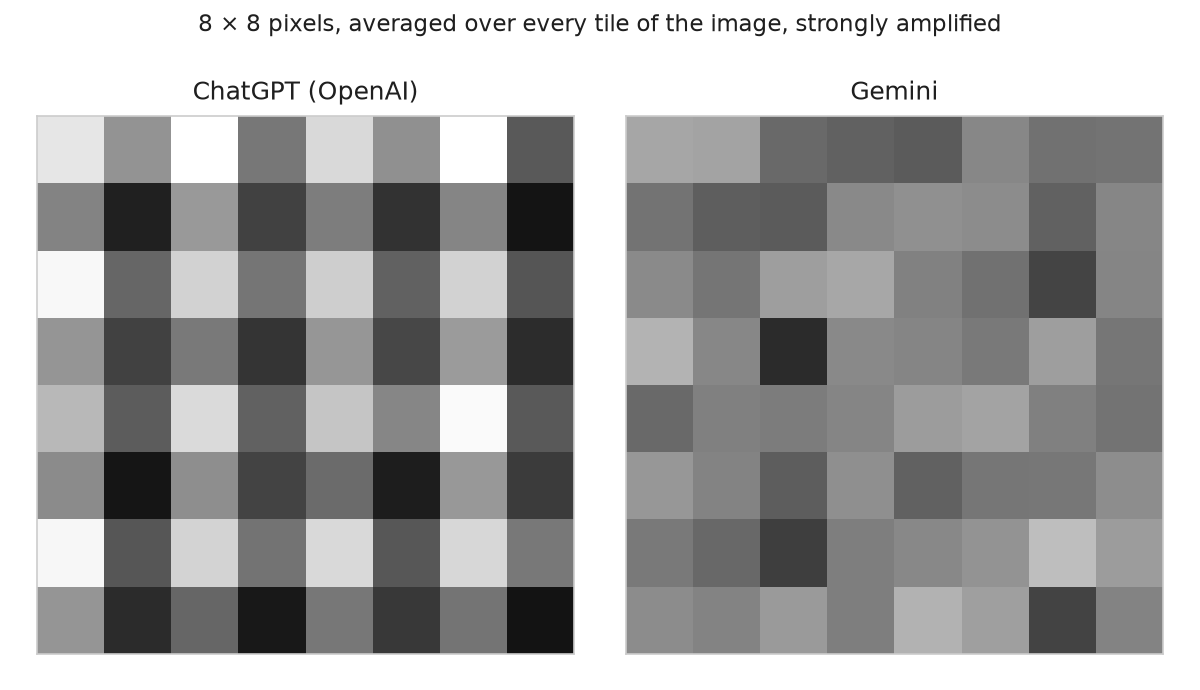
The checkerboard is not the visible wave. Resizing, screenshots and WebP at normal quality erase it. Codex is OpenAI’s programming assistant and can also generate images. In the later Codex run for training data the checkerboard was absent in about 30 percent of the originals, mostly square images, logos and typography. Weak occurrences appear with other generators too, which is why the tool only counts a strong pattern. The cause of the checkerboard remains open.
Claude warned: for a detector the checkerboard would be a trap, because it learns the easiest signal first and ignores everything else. I had pointed out that the texture has appeared since gpt-image-2, which OpenAI introduced in April as ChatGPT Images 2.0, the predecessor of Flare and Sunburst from Part 1. Claude confirmed via the C2PA data (a signed provenance record in the file) that the hero images of my blog posts since May were already gpt-image-2 images.
A Pair of My Own Images
I showed Claude a pair of my own images: the same prompt, generated once in ChatGPT and once in Gemini. A ring above a lava landscape. In the ChatGPT image I marked many spots where the texture was visible. For example a rock edge where similar stones repeated again and again. I wasn’t sure whether Claude would even see the pattern and understand what I meant.
Claude agreed with me on two points. First: it sees images at reduced size, and at double magnification it recognized the pattern too. Second: all previous tests had averaged over entire images, but repetition is a relationship between locations. Claude described it like this: the same kind of element repeats, with different pixels each time.
The Blind Test
Claude proposed a blind test and wrote 20 prompts. I generated each one by hand, once in ChatGPT and once in Gemini, first result taken. Claude built a small app that showed grayscale crops with no hint of origin.
Round 1 with small crops: 72 percent correctly assigned. I found the crops too small. Claude proposed a second round with larger crops from resized images: 89.5 percent. Claude: “The pattern needs area, as you said.”
Claude had locked in its predictions for Round 2 beforehand: more than 61 percent of the OpenAI crops recognized, more than 72 percent correct overall. Both predictions came true. The caveat: they were the same images in both rounds, on the same night. I cannot rule out a learning effect.
A Trained Classifier
DINOv2, the pre-trained model from the failed attempts, stayed unchanged. Claude placed a simple linear classifier on top, a thin layer that only learns: “OpenAI or not?” Trained on the 20 image pairs.
Claude held out one pair at a time and trained on the remaining 19: 20 out of 20 pairs correct. On the blind test crops the classifier got 69 of 76 right, I got 68. Shared errors only two. Claude also checked which layers of the model carry the signal. That pointed to early layers, which respond to how an image was made.
On OpenAI images, rocks, mountain flanks, fog edges, knit sweaters and crowded markets trigger. Smooth surfaces remain neutral.
The limit of the sample: the classifier took older Codex images for Gemini. And 20 pairs is not much.
The Tool and the Heatmap
The classifier became a local tool that runs as an app and on the command line. It gives a verdict in three levels, with an “unclear” range in between, plus a heatmap (a kind of thermal image that uses color to show which parts point to OpenAI), a checkerboard check and a C2PA evaluation (C2PA is a signed provenance record in the image file). Trained on about 1,350 images: 275 of them OpenAI, the rest Midjourney, Stable Diffusion, Gemini and my own camera photos.
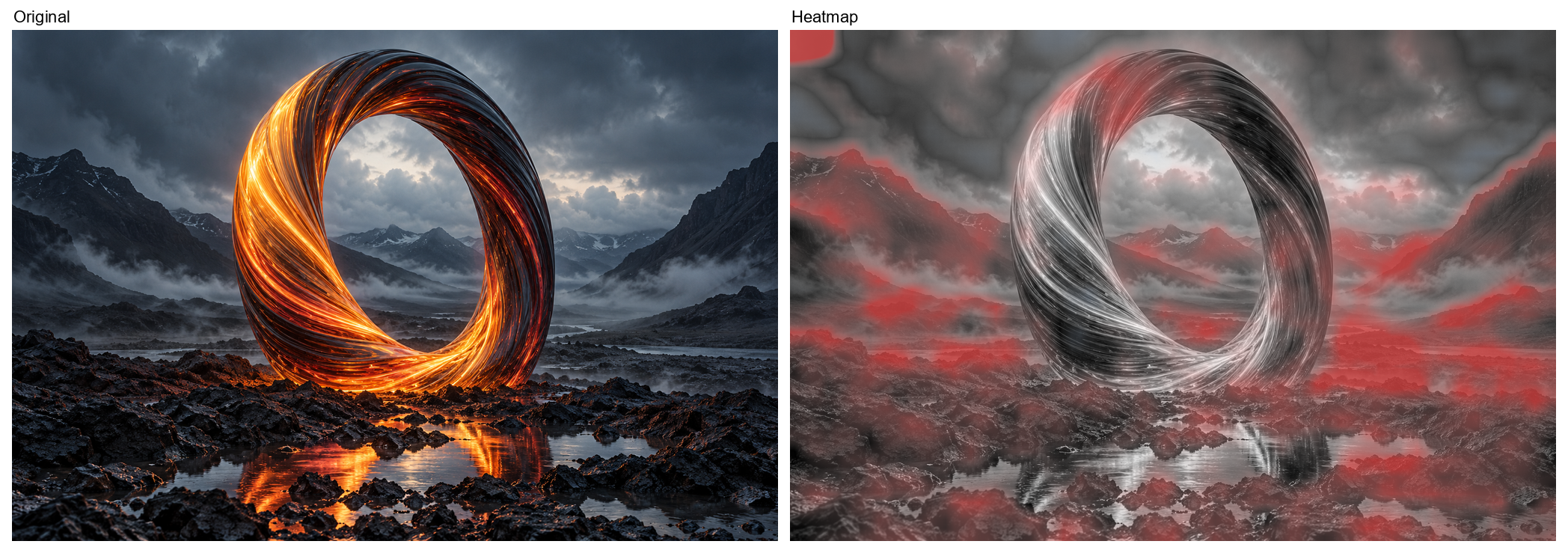
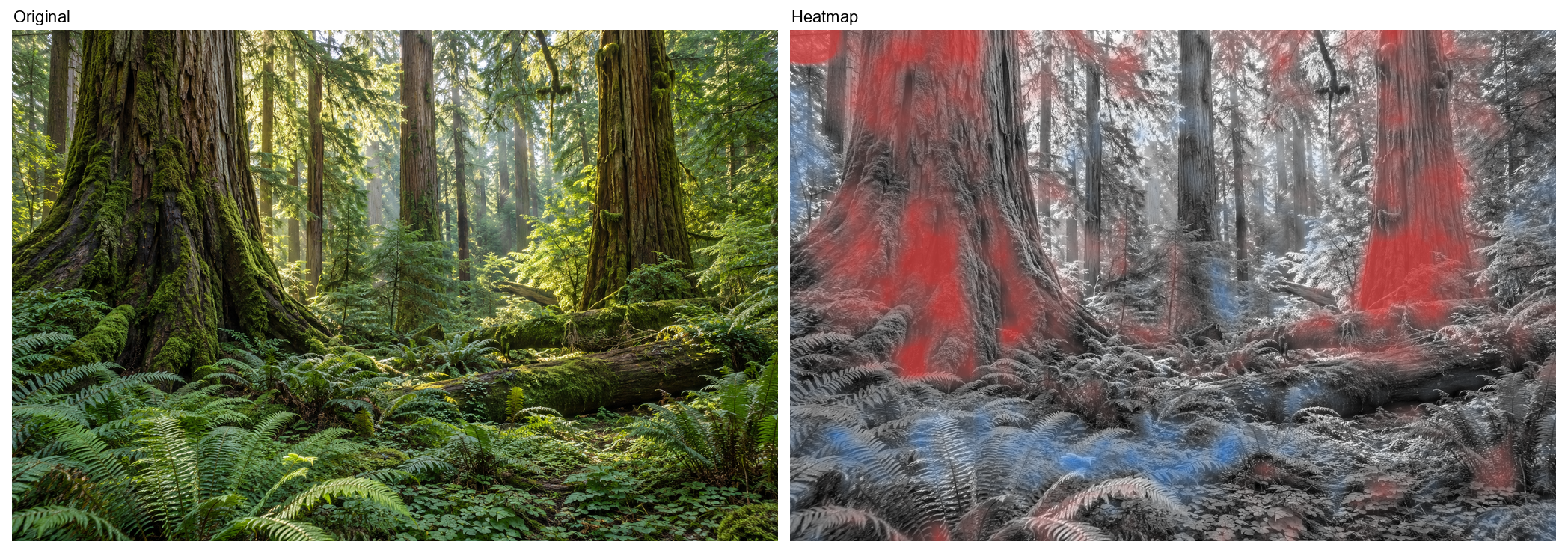
The heatmap does not show where the pattern catches the eye. It shows where OpenAI images differ from the rest. Where it glows red, the model sees evidence for OpenAI; where blue, evidence against. I noticed the difference when I ran an image from the web through the tool where the branches caught my eye. The tool did not mark them. Claude explained it like this: the model has learned which image regions look different in OpenAI images compared to all other sources.
In the ring image heatmap and eye aligned: the shoreline band, where the spots I had shown Claude at the beginning came from, lit up red.
In the jungle image a gap appeared. The tree trunks light up red, the ferns blue, even though I see the texture there. The tool and the eye do not agree everywhere. Both images were part of the training data. The maps show where the model looks; they say nothing about hits on new images.
In the held-out test set: 0.5 percent false alarms and 97.8 percent detected. On 84 real Reddit screenshots it classified nearly a quarter of images from other generators as OpenAI. The tool therefore only gives a hint. Nobody should be accused with it.
Why OpenAI Doesn’t Train This Away
I find this pattern of repetition and too much detail terrible. Once I have seen it, I find it again in every OpenAI image. Many people don’t seem to see it or don’t want to see it. And the images end up in products, in apps and on billboards. I find that a shame.
If a small classifier finds the pattern, OpenAI could use such a classifier as a penalty signal during training. Methods for this already exist. A component of Stable Diffusion learns with a built-in examiner (Rombach et al. 2022). Newer methods refine image models with reward models or human judgments (ImageReward, Xu et al. 2023; Diffusion-DPO, Wallace et al. 2023; DRaFT, Clark et al. 2024).
One risk: the model can learn to trick a single judge. DRaFT documents a related pattern: the model collapses onto a single highly rated image. How easily detectors can be fooled, Carlini and Farid (2020) showed on finished images: invisible modifications are enough to deceive them almost completely. I found no study testing whether that would happen with the wave texture.
Blau and Michaeli described a trade-off in image reconstruction in 2018: the more realistic a result looks, the further it departs from the original. Checkerboard patterns have been known since 2016 as a typical consequence of upsampling in neural networks and can be avoided by a different architecture rather than by more training (Odena et al. 2016; Frank et al. 2020). OpenAI’s architecture is not disclosed.
OpenAI deliberately makes its images identifiable via C2PA and SynthID. About the visible texture there is no official explanation. Shortly after the launch of gpt-image-2 an OpenAI researcher who, by their own account, created the GPT Image series wrote on X: “Working on fixing this right now”. What that referred to is unclear. I keep asking myself: why doesn’t OpenAI train this away?
Part 2 of 2 in the Wave Texture series.